Dolphin Emulator brings online multiplayer to Android

Dolphin is an emulator for the Nintendo GameCube and Wii. It allows PC gamers to enjoy games from both consoles in full HD (1080p), along with a range of enhancements – including support for all PC controllers, turbo speed, networked multiplayer, and more.
To run the Windows version, the 64-bit Visual C++ redistributable for Visual Studio 2022 must be installed.
What games can you plan with Dolphin Emulator?
Dolphin lets you enjoy Nintendo GameCube and Wii games on PC. For a complete list of playable games, you can check out the list here.
What kind of CPU do I need to run Dolphin?
You'll need a quad-core CPU or better. With four cores, Dolphin has two cores for the main emulation threads, a third core for other tasks, and another core for the OS and background tasks.
Do I need a powerful GPU to run the Dolphin emulator?
A discrete graphics card that supports DirectX11.1 and OpenGL 4.4 is highly recommended. The more powerful the graphics card, the more pixels and enhancements you can throw at it.
- Nvidia: A GeForce GTX 1060 or better Nvidia GPU will be able to play Dolphin in HD resolutions with Ubershaders well.
- AMD: A Radeon RX 570 or better AMD GPU will perform well in Dolphin with Ubershaders. AMD generally favors D3D over OpenGL.
- Intel: Iris Pro iGPUs will handle Dolphin well in D3D in Windows. Integrated graphics older than HD 4000 are not supported.
How much RAM do I need to run Dolphin?
Dolphin requires at least 2GB of RAM. RAM speed generally has no effect on emulation performance.
Can I use two or more controllers for local multiplayer on Dolphin emulator?
Yes, if you have two or more friends connecting from the same computer, you can give a single computer multiple controllers. You only need to configure the first two ports of the Controller Configuration page.
What operating systems are supported?
Dolphin is a cross-platform emulator that runs on Windows 10 and Windows 11, Linux, macOS (10.15 Catalina and up), and Android (5.0 and above). Dolphin requires 64-bit operating systems to run properly.
What's New
Welcome to Dolphin 2609's accompanying Progress Report! Like everyone else, we've been doing our best to weather the Techpocalypse brought on by AI, but it's really come after us in the past few months. Our website has been up and down repeatedly lately, as our defenses are barely holding out under the endless bombardment. But now AI has started to come for the emulator directly, with people using AI to mass-scan open source projects for potential vulnerabilities and overwhelm our volunteer team with very verbose reports. Though draining, once these vulnerabilities are out there, we can't ignore them. A lot of effort has had to be diverted to deal with them, both in patching them and adjusting our workflows to better manage them. For more information, zip directly to that section with this link here.
But that's not all. A vulnerability in macOS allowed our macOS buildbot to be briefly compromised by a generic cryptominer attack. We'll skip the quick summary and just point you toward the full story below, which you can reach by clicking here. The important thing is that we have determined that no builds were compromised.
We really just want to keep making Dolphin better. Fortunately, despite these headaches and roadbumps, there are still quite a few notable changes to go through, so let's get to it.
Notable Changes
2606-91 - Android NetPlay by tom-pratt
Under the hood, our mobile and desktop builds are almost identical. Dolphin is simply Dolphin; the only difference is the UI that lays on top. Despite this, our Android release doesn't have feature parity with our flagship desktop builds. A lot of features that are missing in the Android GUI that are present in the desktop GUI are mostly missing because they'd be difficult to implement or would have limited value on Android.
NetPlay once fell into both camps.
For those unaware, Dolphin has lockstep NetPlay available to allow for online play in games that only had local multiplayer. Lockstep NetPlay requires perfect synchronization between each instance, and thus Dolphin has to run in a deterministic mode. This means forcing Single Core (or using a slower and even hackier version of Dual Core), setting the same starting time/seed, and making sure the same inputs make it to every machine. Optionally, save data and cheats can also be synchronized for use on NetPlay. If done right, each instance of the emulator will stay synchronized with no further intervention, with Dolphin only passing inputs.
All of these complexities make NetPlay an enticing, but often cumbersome-to-use feature. And given that it would be annoying to create a good GUI for NetPlay on Android and it would make games run slower on already limited hardware, there was no rush to implement it on Android.
In the 2020s, the scales started to tilt in the other direction. Android devices have gotten stronger and stronger, and though CPU governors and GPU drivers still confound us, many flagship devices can run games in Single Core just fine. Additionally, Jetpack Compose for Android allows for easier and faster development of Android GUIs.
Wanting to share some of his favorite childhood experiences with his own kids, tom-pratt stepped up to the challenge. Using Compose, he built up the NetPlay Android GUI across several pull requests, with an initial bare bones implementation. This made it easier to review and eventually merge, and was quickly followed up with more features, such as controller port configuration for the host, that brings it closer to parity with the desktop implementation.
And now, as of Dolphin 2609, NetPlay is ready for Android users!
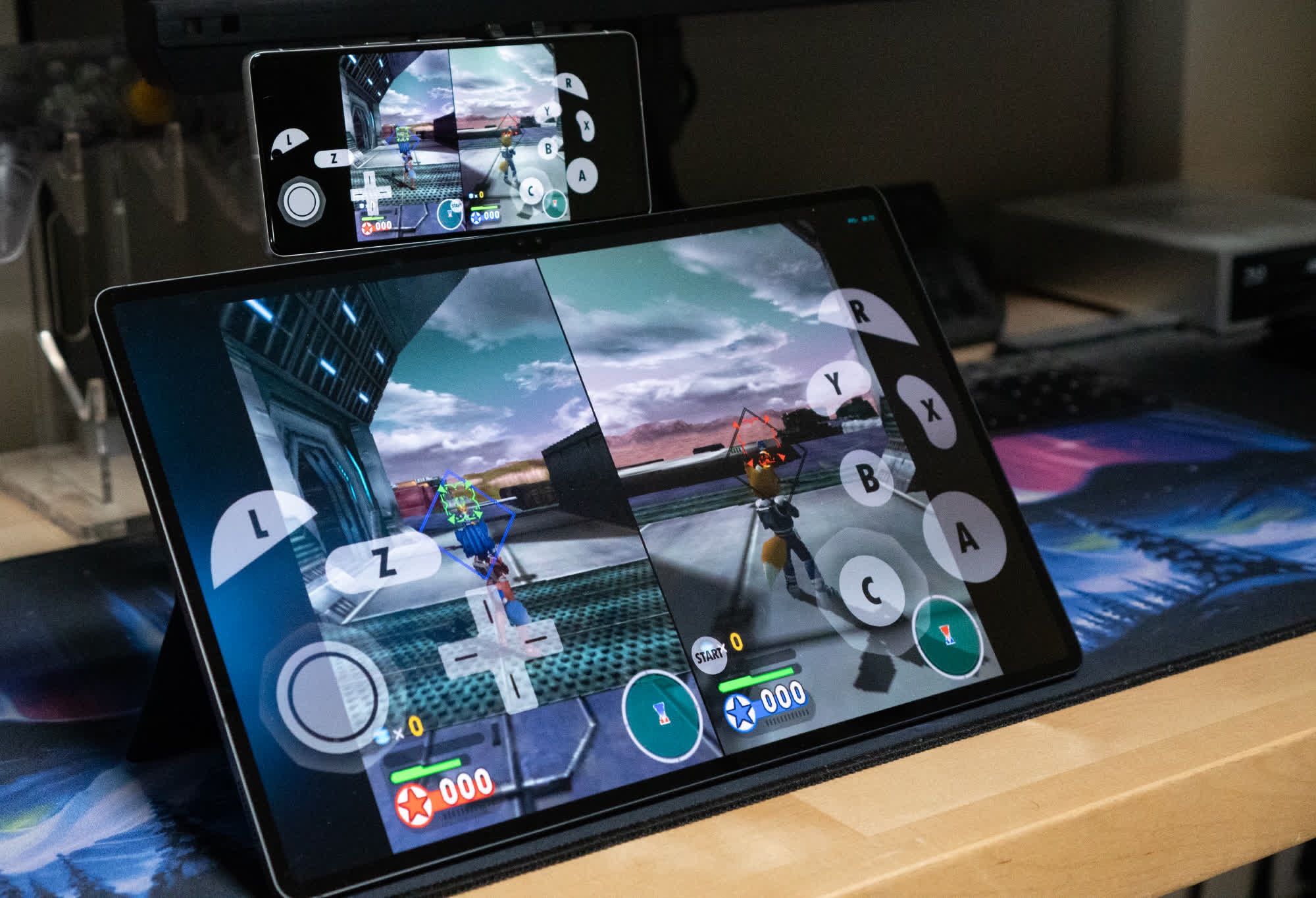
Currently, Android NetPlay requires users to be on a standard network (Wi-Fi, Ethernet, etc), but work has been started on adding support for Wi-Fi Direct, which would allow Android NetPlay to function between nearby devices with no network, similar to how the Nintendo DS's local Wi-Fi play worked.
Note: Using NetPlay over mobile data is not recommended. Even if you can get it to work, the packet loss and latency are not particularly suitable for lockstep multiplayer.
Cross Platform NetPlay
Can Android and desktop Dolphin play together with NetPlay? Yes, they can! Players can mix and match devices with whatever they have, so phones and laptops can play together just fine! However, there are some limitations that must be kept in mind.
Most full-size desktops use x86-64 processors, while most phones use ARM processors, and Dolphin uses different JITs depending on the host CPU. While our ARM64 and x86-64 JITs are very similar, they are not completely identical, and those JIT differences are likely to cause desyncs. Mixing and matching CPU architectures isn't a guaranteed failure though - whether these differences lead to a desync or not depends on what instructions games use and in what order.
Ignoring the JIT problem, there is one more major source of potential desyncs: the Framebuffer! Games that use EFB Access and/or Store EFB/XFB Copies to RAM can get different results from different graphics drivers. If these results mismatch at all, even if it doesn't directly affect game logic, a timebase desync will usually be reported. Often this won't outright break NetPlay (at least immediately), but if the difference becomes big enough, the instances will diverge. Given how special Adreno and Mali drivers are, there may even be problems when playing between different kinds of phones in those games!
What's Your Reaction?
 Like
0
Like
0
 Dislike
0
Dislike
0
 Love
0
Love
0
 Funny
0
Funny
0
 Wow
0
Wow
0
 Sad
0
Sad
0
 Angry
0
Angry
0










Comments (0)