

Apple’s $299 HomeView smart hub is here: 8 highlights, including the wall model

Apple just announced it’s releasing the HomeView for purchase on Nov. 13, with preorders beginning today, Oct. 13. The new device acts as a smart home hub, complete with a touchscreen, smart speaker, Siri AI, and a security camera dashboard.
Also: I’m an Apple loyalist with an Echo home: 5 ways HomeView could make me switch
The HomeView is designed to work with Siri AI as the brain of your Apple smart home. As a central smart home hub, the HomeView competes directly with the Amazon Echo Show and Google Nest Hub.
1. Siri finally gets the upgrade we want

With Siri AI, the Apple smart home is finally getting the generative AI upgrade we’ve wanted for the past couple of years. As a loyal Apple Home user and smart home devices reviewer, I’ve had to watch Siri fall behind Alexa+ and Gemini for Home in my house.
In a world where generative and agentic AI is king, Siri has become obsolete.
Also: Forget Wi-Fi: Apple is betting on Bluetooth with its new home devices
With HomeView, Siri AI will be capable of holding natural conversations, handling multiple commands at once, maintaining context across personal devices, and answering general questions unrelated to your smart home.
2. HomeView recognizes who’s in front of it

The Apple HomeView can recognize up to six people and automatically switch to their personalized home screens when one approaches the device.
“It recognizes your face to shift from a household screen to your own experience, fills the room with incredible sound, keeps you connected to the people who matter most with FaceTime, and makes it easy to control your smart home,” Greg Joswiak, Apple’s SVP of worldwide marketing, said in a press release.
Apple claims that the HomeView keeps everyone’s information private and secure. The device uses the built-in camera and presence sensors to detect when someone is approaching it and allows each user to customize their home screen apps and widgets.
Users can also set up shared photo albums and music for others to enjoy in the home.
3. It’s Matter-compatible, but what else?
Apple said the HomeView works with Apple Home accessories and supports Matter, but it’s unclear whether it’ll act as a Thread border router. It’s also unclear whether the new HomePod mini supports Thread, as its predecessor does.
Also: Google Home Speaker vs. Amazon Echo Dot Max
You can use the Apple HomeView as a Matter and a HomeKit hub in your home. This means that you can connect any Matter-certified smart home devices and any others that feature the “Works with Apple Home” label.
4. It adds an extra safety and security layer

Aside from serving as your smart home hub, the HomeView also provides extra peace of mind for your safety and security. Like the HomePod, this device can detect the sound of smoke and carbon monoxide alarms and subsequently send notifications to the user’s iPhone, iPad, and Apple Watch.
5. Displays up to 9 camera feeds
Acting as a smart home dashboard, the Apple HomeView can display up to 9 camera feeds at once, giving you a complete look at what is happening throughout your home on a single screen. You can easily view your HKSV (HomeKit Secure Video) feeds on HomeView, provided you have an iCloud+ subscription and compatible cameras.
6. HomeView doubles as a family comms center

Like the Amazon Echo devices, HomeView makes it easier than before to stay in touch with your family at home and everywhere else. It can handle FaceTime calls, check locations with Find My, and send Intercom messages to other Apple devices.
Apple’s Intercom feature has been notoriously unreliable in my experience, so I resort to Amazon Alexa’s announcement features to share quick notes with my family. Unfortunately, Intercom messages can take minutes to arrive from one device to another in my home, so we’ve given up on it entirely.
Also: I compared Ring and Blink setups – this brand came out on top
I’m looking forward to testing HomeView’s Intercom feature to hopefully see how Apple has improved what should be a quick method of communication.
7. HomeView uses AI to process security footage

Yes, AI has become a marketing buzzword as of late, but one of HomeView’s most attractive features is that it can describe what happened in a video clip from your security camera.
Also: iPhone 18 Pro Max can’t call or text on AT&T? Apple will replace it for free
The HomeView, paired with HKSV cameras and an iCloud+ subscription, generates a breakdown of what happened in the video you’d like to learn more about. Instead of having to watch multiple clips from start to finish, you can get a description: Someone in a blue vest approached your door and dropped off a package.
8. There’s also a wall-mounted option
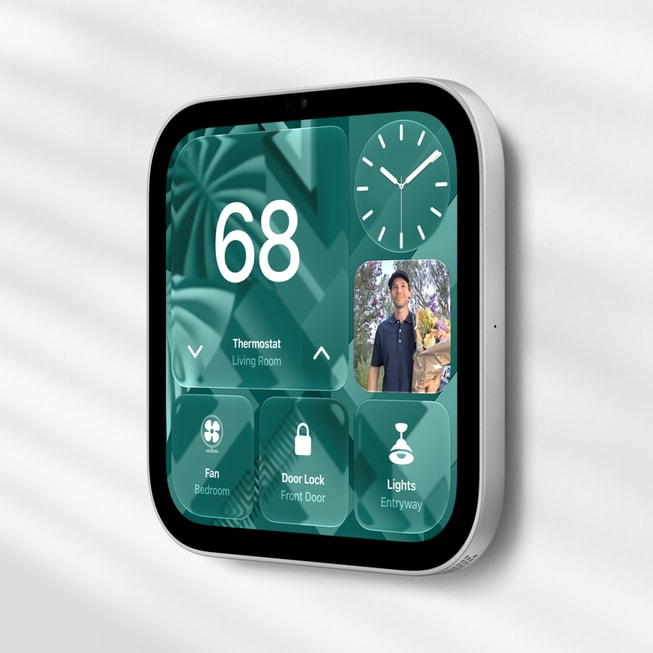
As a tabletop device, the Apple HomeView has a large speaker that acts as its base. This rounded speaker features two full-range drivers, a dedicated down-firing woofer, two passive radiators, and spatial audio support.
Apple is also offering a wall-mounted alternative for the same price. This isn’t the same device that you can choose to place on a tabletop or mount on a wall — you have to decide which one to purchase at checkout.
The wall-mounted option doesn’t appear to have a dedicated woofer, and it’s unclear whether it’ll support spatial audio. Instead, the wall-mounted HomeView will have two custom drivers and computational audio tuned for wall placement.
Also: Your iPhone just got a hidden anti-scam upgrade in iOS 27: How to enable it
You can purchase an extra USB-C wall connector from Apple for $60, an AC wire for $80, and a PoE setup for $130.

Maria Diaz is a staff writer with a passion for home automation, smart home devices, and tablets. With a background in graphic design, photography, and filmmaking, she has a bachelor's in Mass Communication and experience in journalism and film. See full bio
What's Your Reaction?
 Like
0
Like
0
 Dislike
0
Dislike
0
 Love
0
Love
0
 Funny
0
Funny
0
 Wow
0
Wow
0
 Sad
0
Sad
0
 Angry
0
Angry
0










Comments (0)